Concept of Pipelines in Linux
In Linux, a pipeline is a sequence of commands connected by the pipe operator (|), where the Standard Output (stdout) of one command is automatically passed as the Standard Input (stdin) to the next. This allows you to chain multiple simple programs together to perform complex data processing in a single line.
Pipeline Data Flow Diagram
The following diagram illustrates how data flows through a basic pipeline like
command1 | command2: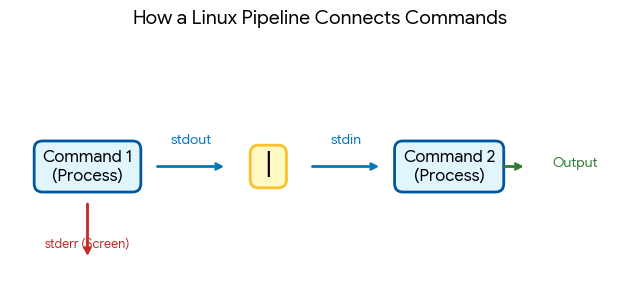
Key Characteristics of Pipelines
- Simultaneous Execution: All commands in a pipeline start at the same time. Command 2 doesn’t wait for Command 1 to finish; it begins processing data as soon as Command 1 produces its first bit of output.
- In-Memory Transfer: Data is passed through a temporary memory buffer (the “pipe”) rather than being written to a physical file on the disk, making it extremely fast.
- Unidirectional Flow: Data only moves from left to right.
- Standard Error Isolation: By default, only stdout is piped. Error messages (stderr) are still printed directly to the terminal screen unless you specifically merge them (e.g., using
|&in some shells).
VI Editor in Linux
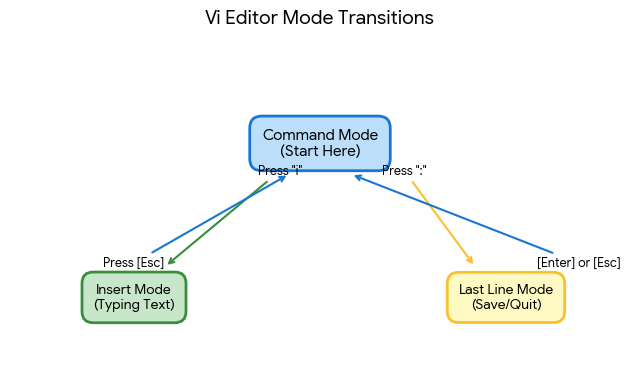
The vi editor (visual editor) is the standard text editor for Linux. It is unique because it is modal, meaning the keys on your keyboard do different things depending on which “mode” you are in.
The Three Modes of Vi
- Command Mode (Normal): The “hub.” You start here. Keys are used for navigation (moving the cursor), deleting, and copying.
- Insert Mode: Used for actually typing text.
- Last Line Mode (Ex Mode): Used for “big” actions like saving, quitting, or searching. You access it by typing a colon (
:).