Essential CorelDRAW Tools
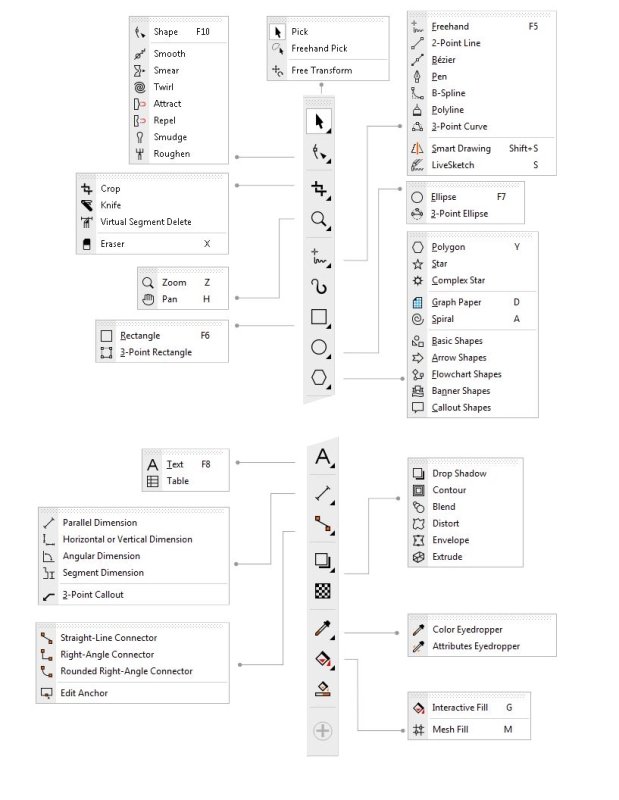
The following tools are the most commonly used for creating and editing vector graphics:
- Pick Tool: The primary selection tool used to select, move, resize, rotate, and skew objects.
- Shape Tool: Essential for editing the shape of objects by manipulating their nodes and paths.
- Crop & Knife Tools: Used to remove unwanted areas or slice objects into separate pieces.
- Curve Tools: A group for drawing custom lines.
- Geometric Shapes: Dedicated tools for drawing standard shapes like Rectangles, Ellipses (circles), and Polygons (stars/grids).
- Text & Table Tools: Used to add “Artistic Text” (for headlines) or “Paragraph Text” (for large blocks of copy), and for creating structured tables.
- Interactive Fill & Transparency: Allows you to apply gradients, patterns, and varying levels of opacity directly to an object.
- Effect Tools: A collection for adding depth, including Drop Shadow, Contour, Blend, and 3D Extrude.
- Eyedropper Tools: Used to sample and copy colors or attributes (like line thickness) from one object to another.