Introduction to CorelDraw
Introduction to CorelDraw
CorelDRAW is a professional vector graphics editor used primarily for creating scalable artwork such as logos, brochures, and technical illustrations. Unlike pixel-based software like Photoshop, CorelDRAW uses mathematical formulas to define shapes which means the design will never lose quality.
What is CorelDRAW?
CorelDRAW is a vector graphics editing software developed by Corel Corporation. It is used to design logos, posters, visiting cards, banners, brochures, invitations and illustrations. Its own file format is .CDR.
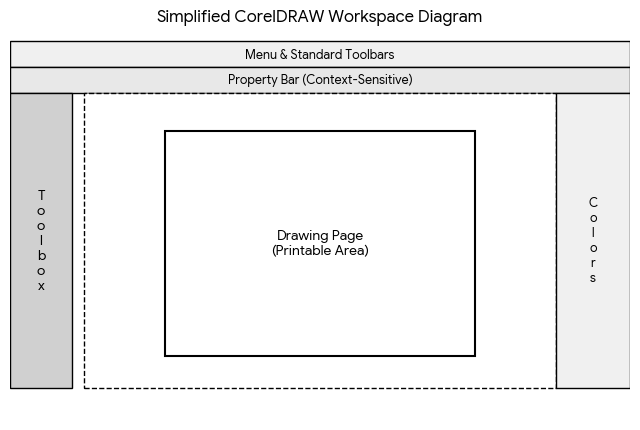
Parts of the CorelDRAW Window
- Title bar and menu bar.
- Standard toolbar: New, Open, Save, Print, Undo.
- Property bar: shows options for the selected tool or object.
- Toolbox: Pick, Shape, Crop, Zoom, Freehand, Rectangle, Ellipse, Polygon, Text and Fill tools.
- Drawing page and rulers.
- Colour palette on the right.
- Docker windows for object properties and effects.
- Status bar at the bottom.
Uses
- Logo and brand design
- Printing work such as banners and flex boards
- Page layouts and brochures
- Illustration and clip art
Advantages
Vector images do not lose quality when resized, files are small, and the tools are easy for beginners.
Important Questions
Q. What is CorelDRAW?
Ans. CorelDRAW is a vector-based graphics design software developed by Corel Corporation.
Q. What is the default file extension of CorelDRAW?
Ans. .CDR
Q. What is the use of the property bar?
Ans. It shows the settings for the currently selected tool or object.