← Back to Computer Science-Full Course (Plus-1)
Concept of Desk Top Publishing
Concept of Desk Top Publishing
Desktop Publishing (DTP) is the process of creating high-quality documents like brochures, magazines, newspapers, and posters using a computer and specialized software.
The DTP Workflow Diagram
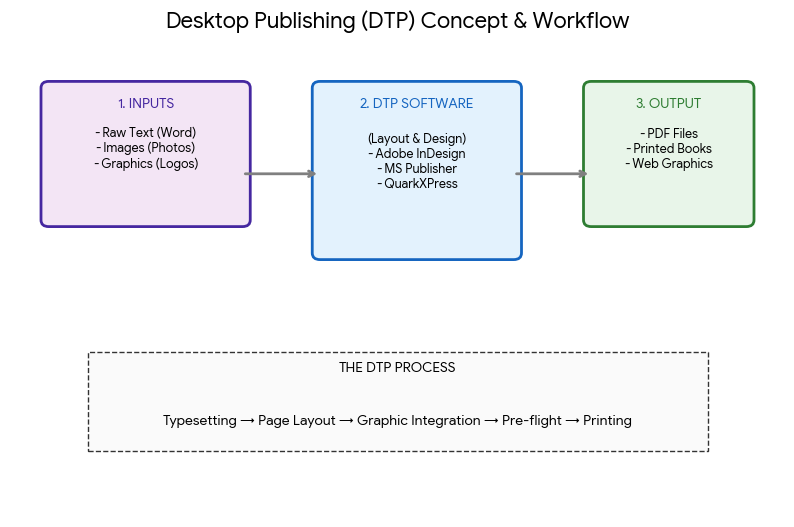
Features of DTP
- Page layout and design
- Font and style control
- Image editing and placement
- Professional-quality output
Advantages
- Produces high-quality documents
- Easy editing and formatting
- Saves time and cost
- Attractive presentation
Uses of DTP
- Newspapers, magazines and newsletters
- Books, brochures and pamphlets
- Posters, invitation cards and visiting cards
- School magazines, certificates and notices
Features of DTP Software
- Combining text and graphics on the same page.
- Precise control over page layout using columns, rulers and guides.
- A wide choice of fonts, sizes and styles.
- Master pages for repeating elements such as headers and page numbers.
- WYSIWYG (What You See Is What You Get) display, so the screen matches the printed page.
- High-quality printing output.
Popular DTP Software
Adobe PageMaker, Adobe InDesign, CorelDRAW, QuarkXPress, Microsoft Publisher and Scribus.
Steps in Desktop Publishing
- Planning the layout
- Typing or importing text
- Inserting and arranging graphics
- Formatting and proofreading
- Printing or exporting as PDF
Important Questions
Q. What is Desktop Publishing?
Ans. Desktop Publishing (DTP) is the use of a computer and special software to design and produce printed documents that combine text and graphics.
Q. Name any three DTP software.
Ans. Adobe PageMaker, Adobe InDesign and CorelDRAW.
Q. What is WYSIWYG?
Ans. What You See Is What You Get: the document looks on screen exactly as it will look when printed.