Chapter 5: Emerging Modes of Business
Chapter 5
Emerging Modes of Business
1. Meaning of Emerging Modes of Business
Emerging modes of business are new ways of carrying out business activities using modern technology and communication systems.
Businesses increasingly use digital networks to purchase materials, sell products, receive payments and communicate with customers.
Example: A clothing shop accepts orders through its website and receives payment electronically.
2. E-Business: Meaning
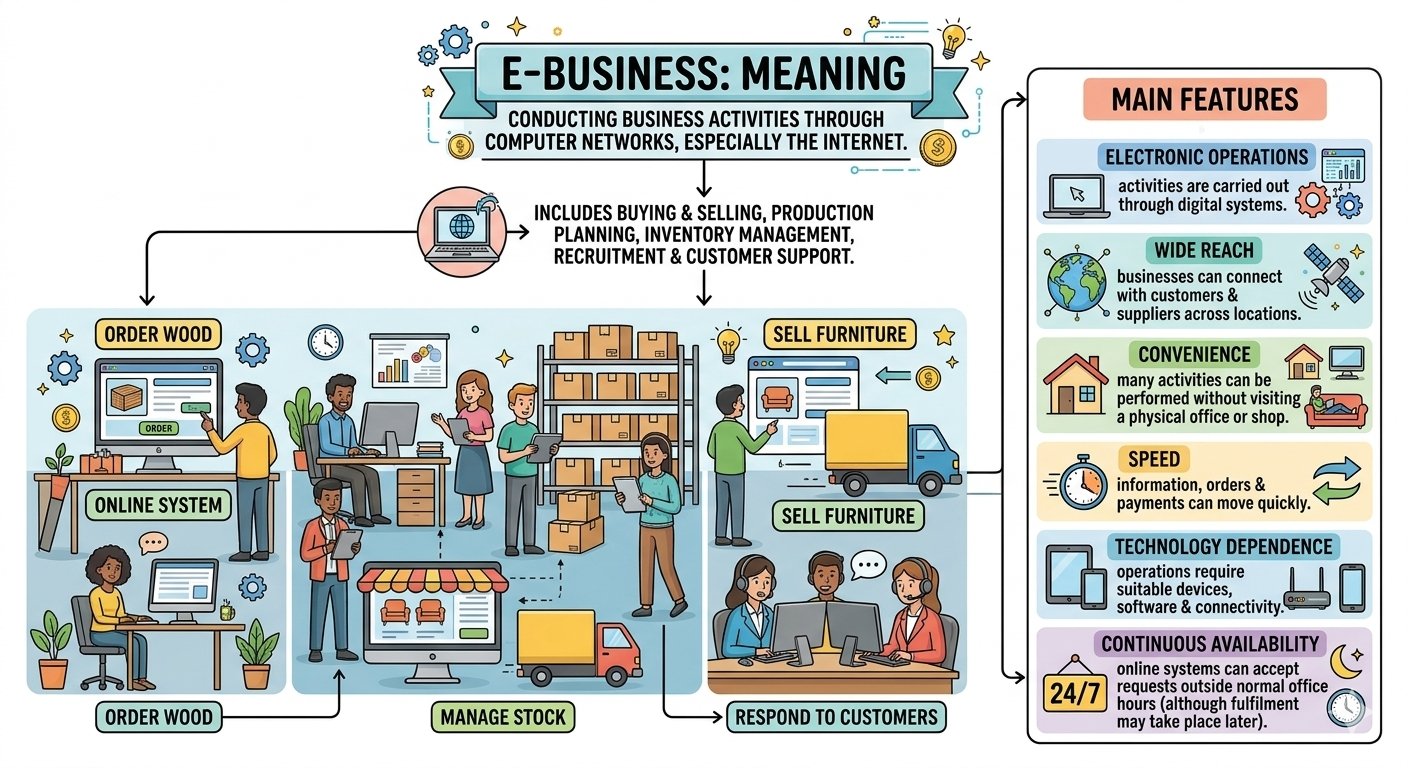
E-business means conducting business activities through computer networks, especially the internet.
It includes buying and selling as well as activities such as production planning, inventory management, recruitment and customer support.
Example: A furniture business uses online systems to order wood, manage stock, sell furniture and respond to customers.
Main Features
- Electronic operations: Activities are carried out through digital systems.
- Wide reach: Businesses can connect with customers and suppliers across locations.
- Convenience: Many activities can be performed without visiting a physical office or shop.
- Speed: Information, orders and payments can move quickly.
- Technology dependence: Operations require suitable devices, software and connectivity.
- Continuous availability: Online systems can accept requests outside normal office hours, although fulfilment may take place later.
E-Business and E-Commerce: Difference
| Basis | E-Business | E-Commerce |
|---|---|---|
| Meaning | Conducting business activities electronically | Buying and selling goods and services electronically |
| Scope | Wider | Narrower |
| Includes | Sales, purchasing, inventory, recruitment and internal coordination | Online orders, sales and related payments |
| Relationship | Includes e-commerce | Is a part of e-business |
| Example | Managing stock and selling products through an online system | A customer purchasing a book online |
Remember: All e-commerce is part of e-business, but e-business includes more than online buying and selling.
3. Scope of E-Business
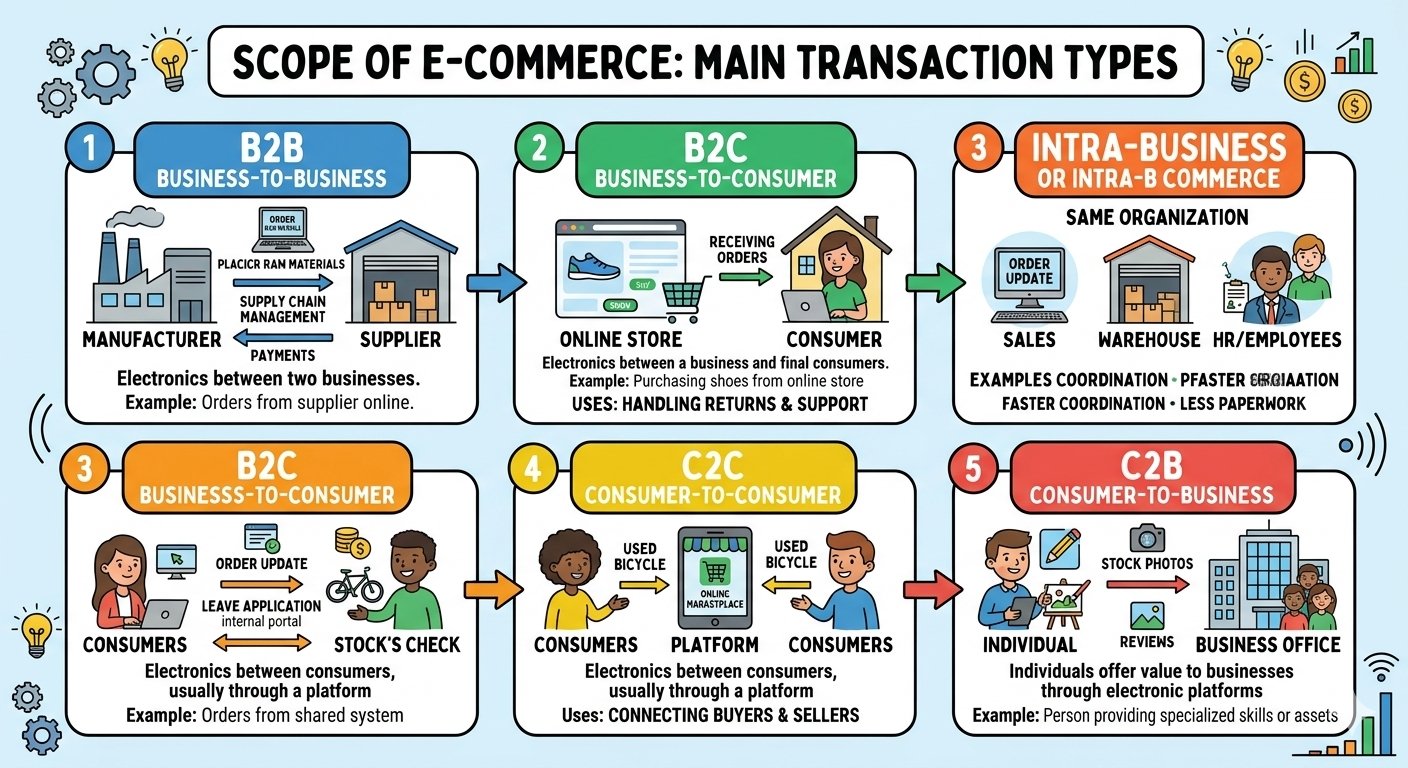
The scope of e-business includes transactions between businesses, with consumers and within an organization.
A. Business-to-Business — B2B
B2B means electronic transactions between two businesses.
Examples:
- A manufacturer orders raw materials from a supplier online.
- A retailer purchases goods through a wholesaler’s portal.
Uses
- Placing and tracking orders.
- Sharing product specifications.
- Coordinating production and delivery.
- Making payments.
- Managing supply chains.
B. Business-to-Consumer — B2C
B2C means electronic transactions between a business and its final consumers.
Example: A customer purchases shoes from an online store.
Uses
- Displaying products and prices.
- Receiving orders.
- Collecting payments.
- Providing delivery updates.
- Handling complaints, returns and support.
C. Intra-Business or Intra-B Commerce
Intra-business means electronic activities within the same organization.
Examples:
- The sales department updates the warehouse about an order.
- Employees apply for leave through an internal portal.
- Production staff check stock through a shared system.
Benefits
- Faster coordination.
- Less paperwork.
- Better information sharing.
- Improved control over resources.
D. Consumer-to-Consumer — C2C
C2C means electronic transactions between consumers, usually through a platform.
Example: One person sells a used bicycle to another through an online marketplace.
The platform helps buyers and sellers connect, although payment and delivery arrangements may vary.
E. Consumer-to-Business — C2B
C2B means individuals offer goods, services or value to businesses through electronic platforms.
Example: A freelance designer provides a logo to a company online.
Quick Comparison
| Mode | Parties involved | Example |
|---|---|---|
| B2B | Business and business | A factory orders packaging materials online |
| B2C | Business and consumer | A customer buys a school bag online |
| Intra-B | Departments or people within a business | Sales staff update the stock system |
| C2C | Consumer and consumer | A person sells a used desk to another person |
| C2B | Individual and business | A freelancer provides a service to a company |
4. Benefits of E-Business
1. Ease of Formation
An online business may begin with fewer physical facilities than a comparable shop-based business.
However, it still needs planning, funds and any required registrations.
2. Lower Operating Costs
E-business can reduce expenses relating to premises, paperwork and some routine activities.
It also creates costs such as website maintenance, delivery, advertising and cybersecurity.
3. Wider Market Reach
Businesses can reach customers beyond their local area and may enter national or international markets.
4. Convenience
Customers can view products, place orders and access many services from a convenient location.
5. Faster Transactions
Orders, information and payment instructions can be processed quickly.
6. Greater Availability
A website or application can accept orders beyond normal shop hours.
7. Better Customer Service
Businesses can provide order tracking, frequently asked questions, electronic support and personalized updates.
8. Improved Coordination
Suppliers, departments and delivery partners can share information through connected systems.
9. Less Paperwork
Electronic orders, invoices and records reduce the need for physical documents.
10. Better Information for Decisions
Businesses can study sales, stock levels and customer preferences to improve decisions.
11. Support for Small Businesses
Small enterprises can display products and reach customers without immediately opening many physical outlets.
5. Limitations of E-Business
| Limitation | Explanation |
|---|---|
| Limited personal interaction | Customers may miss face-to-face advice |
| No physical inspection before purchase | Buyers often rely on images, descriptions and reviews |
| Technology dependence | Failures in connectivity or systems can interrupt operations |
| Security risks | Fraud, unauthorized access and data theft may occur |
| Delivery problems | Goods may arrive late, damaged or at the wrong address |
| Digital divide | Some people lack access, skills or confidence |
| Resistance to change | Employees or customers may prefer traditional methods |
| Privacy concerns | Personal information may be collected or used improperly |
6. Resources Required for Successful E-Business Implementation
A successful e-business requires more than a website. It needs technology, people, finance and reliable business processes.
1. Suitable Hardware
Devices are required to operate and access the system.
Examples: Computers, smartphones, scanners and networking equipment.
2. Appropriate Software
Software supports different business functions.
Examples:
- Website or mobile application.
- Inventory management system.
- Accounting software.
- Customer support tools.
- Security software.
3. Reliable Internet and Hosting
The business needs dependable connectivity and a hosting arrangement that keeps its online services accessible.
4. Well-designed Website or Application
The platform should provide:
- Clear product descriptions.
- Accurate prices.
- Easy navigation.
- A simple ordering process.
- Contact details.
- Delivery, cancellation and return information.
It should also work well on mobile devices.
5. Trained Employees
Employees should understand order processing, customer service, digital payments, stock management and safe handling of information.
6. Financial Resources
Funds are needed for development, equipment, promotion, staff, maintenance and working capital.
7. Reliable Suppliers and Inventory Systems
The business must know what is available and arrange timely supplies.
Example: The website should not repeatedly accept orders for unavailable products.
8. Payment Facilities
The business needs suitable arrangements for collecting payments and handling refunds.
9. Logistics and Delivery Network
Physical products require packing, dispatch, delivery tracking and return handling.
10. Security and Data Protection
The business needs access controls, secure connections, updates, backups and procedures to protect customer information.
11. Customer Support
Customers need help with orders, payments, delivery and complaints.
12. Management Support and Planning
Management must set clear objectives, assign responsibilities and regularly review performance.
Resource Summary
| Resource | Purpose |
|---|---|
| Hardware | Runs and accesses systems |
| Software | Performs business functions |
| Internet and hosting | Connects users and keeps services available |
| Skilled people | Operate systems and serve customers |
| Finance | Pays setup and operating costs |
| Payment arrangements | Collects money and supports refunds |
| Logistics | Delivers goods and handles returns |
| Security systems | Protects access, information and operations |
7. Online Transactions
An online transaction is a business dealing carried out through the internet or another digital network.
It may involve ordering, payment and delivery of goods or services.
Stages of an Online Purchase
Stage 1: Pre-Purchase Activities
The customer:
- Identifies a need.
- Searches for sellers.
- Compares products, prices and terms.
- Checks seller information and reviews.
- Creates an account if required.
Example: A student compares different school bags.
Stage 2: Placing the Order
The customer:
- Selects the product.
- Chooses the quantity or other options.
- Adds it to the shopping cart.
- Enters delivery details.
- Reviews the total price.
- Confirms the order.
Stage 3: Payment
The customer selects an available payment method and completes any required authentication.
The business or payment provider sends a confirmation of the transaction status.
Stage 4: Delivery or Fulfilment
- Physical goods: Delivered through a courier or other transport service.
- Digital goods: Downloaded or accessed electronically.
- Services: Provided online or at an agreed time and place.
Stage 5: After-Sales Activities
These may include:
- Installation or assistance.
- Feedback and reviews.
- Returns or replacement.
- Complaint handling.
- Refunds according to applicable terms.
Example
A customer orders a book online, pays electronically, receives an order confirmation and later receives the book through a courier.
Important: Placing an order, making payment and receiving delivery are separate stages. Success at one stage does not guarantee completion of all others.
8. Payment Mechanisms
A payment mechanism is the method used to transfer money from the buyer to the seller.
A. Cash on Delivery — COD
The customer pays when the order is delivered.
Advantage: Payment is made at delivery rather than in advance.
Limitation: Delivery does not automatically mean the customer can inspect the product before paying; this depends on the seller’s arrangements.
B. Debit Card
Payment is made using funds available in the linked bank account.
Example: Paying ₹800 for a bag using a debit card.
C. Credit Card
The card issuer provides a credit limit that the customer uses for payments. The customer repays according to the card’s terms.
Important: Interest or charges may apply if repayment conditions are not met.
D. Internet Banking
The customer uses a bank’s online service to authorise payment or transfer funds.
E. UPI
UPI enables payments between participating bank accounts through supported applications.
Customers may pay using a payment address, account-linked identifier or QR code.
F. Mobile Wallet
A mobile wallet allows payments using stored value, subject to the wallet’s features and applicable conditions.
Remember: A wallet and a UPI application are not necessarily the same thing.
G. Electronic Funds Transfer
Money is transferred electronically between accounts through supported banking systems.
Example: A business transfers payment to its supplier.
H. Electronic Cheque
An electronic cheque is a cheque represented and authenticated electronically through an authorized arrangement.
It is different from simply sending a photograph of an ordinary cheque.
I. Digital Cash
Some textbooks use digital cash to describe electronically stored monetary value used for payments.
It is a broad concept and should not automatically be treated as the same as cryptocurrency.
Comparison of Common Methods
| Method | Source or timing of payment |
|---|---|
| COD | Payment at delivery |
| Debit card | Money from a linked bank account |
| Credit card | Credit provided by the issuer |
| Internet banking | Payment authorized through online banking |
| UPI | Payment through a supported account-based system |
| Wallet | Payment using stored wallet value |
| Electronic transfer | Transfer between accounts |
9. Role of a Payment Gateway
A payment gateway is a technology service that securely passes payment information between the customer, merchant and payment-processing systems.
Simplified Process
- The customer selects a payment method.
- Payment information is transmitted securely.
- The relevant systems check and authenticate the transaction.
- An approval or failure message is returned.
- The merchant receives the payment status and processes the order accordingly.
Remember: Authorization, confirmation and final settlement are related but separate parts of payment processing.
10. Security and Safety of Business Transactions
Security of online transactions means protecting money, information and systems from unauthorized access, misuse, alteration or disruption.
Safe e-business should protect:
| Requirement | Meaning |
|---|---|
| Confidentiality | Information is accessible only to authorized persons |
| Integrity | Information is not improperly altered |
| Authentication | The identity of a user or system is checked |
| Availability | Systems and information are accessible when needed |
| Accountability | Records help establish who performed an action |
11. Main Risks in Online Transactions
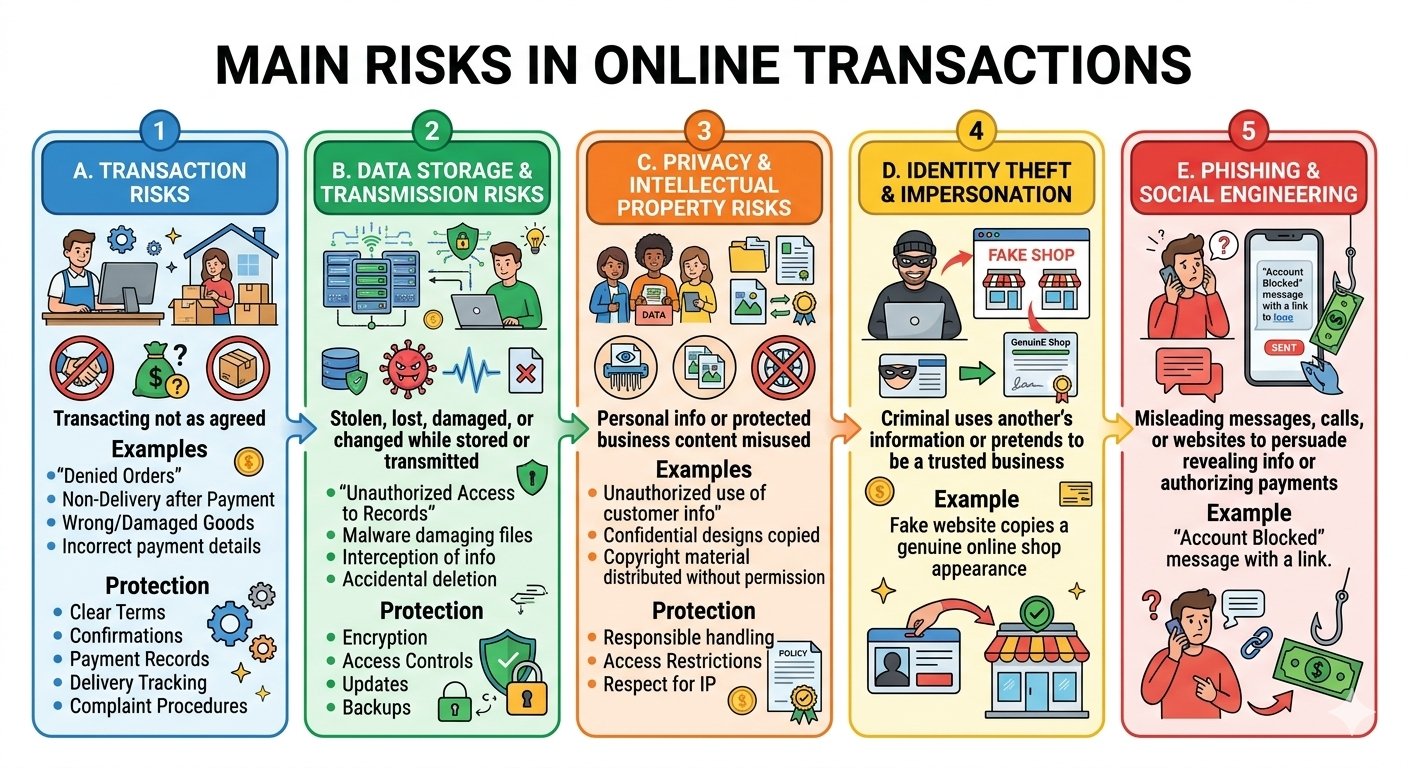
A. Transaction Risks
These arise when the transaction is not carried out as agreed.
Examples:
- A seller denies receiving an order.
- A customer denies placing an order.
- Payment is made but goods are not delivered.
- Wrong or damaged goods are delivered.
- Payment information is entered incorrectly.
Protection: Clear terms, order confirmations, payment records, delivery tracking and complaint procedures.
B. Data Storage and Transmission Risks
Information may be stolen, lost, damaged or changed while stored or transmitted.
Examples:
- Unauthorized access to customer records.
- Malware damaging files.
- Interception of sensitive information.
- Accidental deletion of business data.
Protection: Encryption, access controls, updates and backups.
C. Privacy and Intellectual Property Risks
Personal information or protected business content may be misused.
Examples:
- Customer information used without proper authority.
- Confidential designs copied.
- Copyrighted material distributed without permission.
Protection: Responsible data handling, access restrictions and respect for intellectual property rights.
D. Identity Theft and Impersonation
A criminal uses another person’s information or pretends to be a trusted business.
Example: A fake website copies the appearance of a genuine online shop.
E. Phishing and Social Engineering
Fraudsters use misleading messages, calls or websites to persuade people to reveal information or authorize payments.
Example: A message claims an account will be blocked unless the customer opens a link and enters banking details.
12. Measures for Secure E-Business
1. Encryption
Encryption converts readable information into a coded form that can be read only with the appropriate key.
It helps protect information during transmission and storage.
2. Secure Connections
HTTPS helps protect information exchanged between a browser and a website.
Important: HTTPS alone does not prove that the seller is trustworthy.
3. Strong Authentication
Strong, unique passwords and multi-factor authentication help prevent unauthorised access.
4. Access Controls
Employees should access only the systems and information needed for their work.
Example: A delivery employee should not have unrestricted access to customer payment data.
5. Digital Signatures
Digital signatures use cryptographic methods to help verify the signer and detect changes to a signed electronic document.
They are different from a pasted image of a handwritten signature.
6. Firewalls and Security Software
Firewalls control network traffic, while suitable security tools help detect and block threats.
7. Regular Updates
Updating software helps correct known security weaknesses.
8. Backups
Secure backups help restore information after accidental deletion, device failure or a cyber incident.
9. Transaction Records
Order numbers, invoices, payment references and delivery records help resolve disputes.
10. Employee Awareness
Staff should be trained to recognise suspicious requests and handle information safely.
11. Trusted Payment Processing
Businesses should use suitable payment providers and protect payment information according to their obligations.
12. Clear Customer Policies
Delivery, returns, refunds, privacy and complaint procedures should be clearly explained.
13. Safety Precautions for Customers
Before making an online purchase:
- Check the seller’s identity, website address and contact information.
- Read product details, total charges and return conditions.
- Treat unusually attractive offers with caution.
- Use official applications or carefully verified websites.
During and after payment:
- Never disclose passwords, PINs or OTPs to another person.
- Check the payee and amount before authorising payment.
- Do not enter a payment PIN merely to receive money.
- Avoid sensitive transactions on shared devices or untrusted networks.
- Save order confirmations and payment references.
- Check account activity and report suspicious transactions promptly.
14. Traditional Business and E-Business: Differences
| Basis | Traditional Business | E-Business |
|---|---|---|
| Main method | Physical interaction and conventional channels | Electronic networks |
| Market reach | Often depends strongly on physical presence | Can reach distant markets digitally |
| Availability | Often linked to office or shop hours | Systems may accept orders at any time |
| Paperwork | Greater use of physical records | Greater use of electronic records |
| Customer interaction | Often face-to-face | Often through digital channels |
| Product inspection | Physical inspection may be possible | Usually relies on descriptions and images before delivery |
| Costs | May involve greater spending on physical outlets | May reduce premises costs but adds technology and fulfilment costs |
| Risks | Includes physical and operational risks | Also includes cyber, privacy and online fraud risks |