What is an Overhead Projector?
An Overhead Projector (OHP) is a teaching device used to display text, diagrams, charts, and images from a transparent plastic sheet (transparency) onto a screen or wall. It allows the teacher to present information to a large group of students while facing the class.
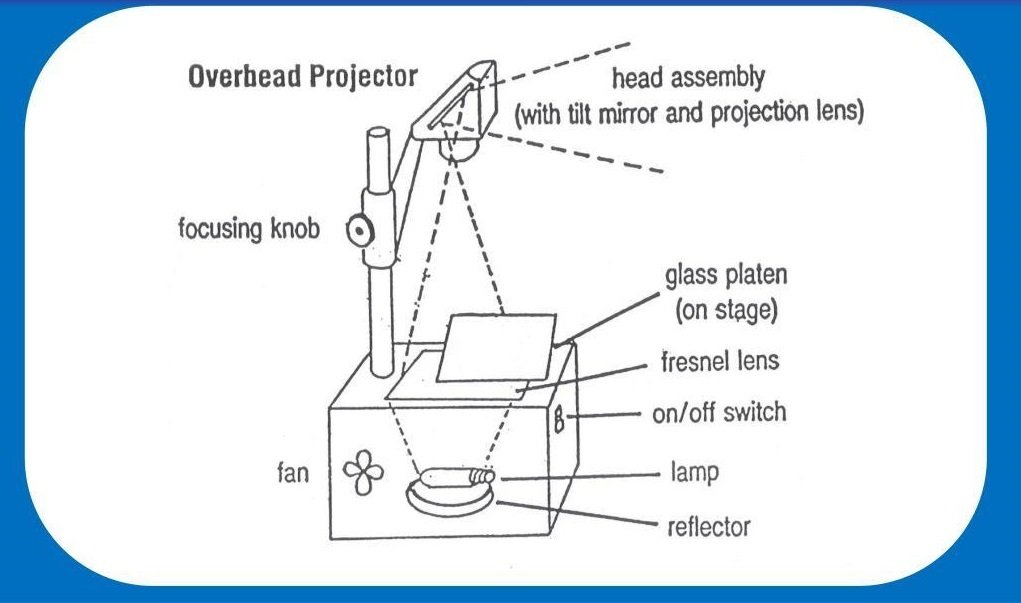
Main Parts of an Overhead Projector
- Lamp (Light Source): Produces bright light.
- Glass Stage: Holds the transparency sheet.
- Mirror: Reflects the light upward.
- Projection Lens: Focuses and enlarges the image.
- Projection Head/Arm: Directs the image to the screen.
- Cooling Fan: Prevents the lamp from overheating.
Working of an Overhead Projector
- Place the transparency sheet on the glass stage.
- Switch on the projector.
- The lamp shines light through the transparency.
- The mirror and lens enlarge and project the image onto the screen.
- Adjust the focus until the image becomes clear.
Advantages of an Overhead Projector
- Easy to operate and maintain.
- Displays information to a large audience.
- Teacher can face students while teaching.
- Transparencies can be reused many times.
Disadvantages of an Overhead Projector
- Requires electricity to operate.
- Bulb may become hot or burn out.
- Limited to transparent sheets only.
Handling of Overhead Projectors
Before Using the OHP
- Place the projector on a stable and flat table.
- Ensure the power cord is connected safely.
- Clean the glass stage and projection lens.
- Keep the screen clean and properly positioned.
- Use clean, wrinkle-free transparency sheets.
During Use
- Switch on the projector only when needed.
- Place the transparency correctly on the glass stage.
- Adjust the focus for a sharp image.
- Do not block the ventilation openings.
- Avoid touching the hot lamp or lens.
- Keep food and liquids away from the projector.
After Use
- Switch off the projector.
- Allow it to cool before moving or storing it.
- Remove the transparency sheet.
- Clean the glass stage with a soft cloth.
- Cover the projector to protect it from dust.
- Store it in a dry and safe place.